Free Ecommerce Website Builder: Launch a Real Online Store in a Day (No Code, No Trial)
Every “free” builder charges you the moment you want a real store. CartQu includes drag-and-drop blocks, bilingual storefronts, smart catalog pickers, and instant publishing — free, with no credit card.
The CartQu Team
E-commerce Specialists
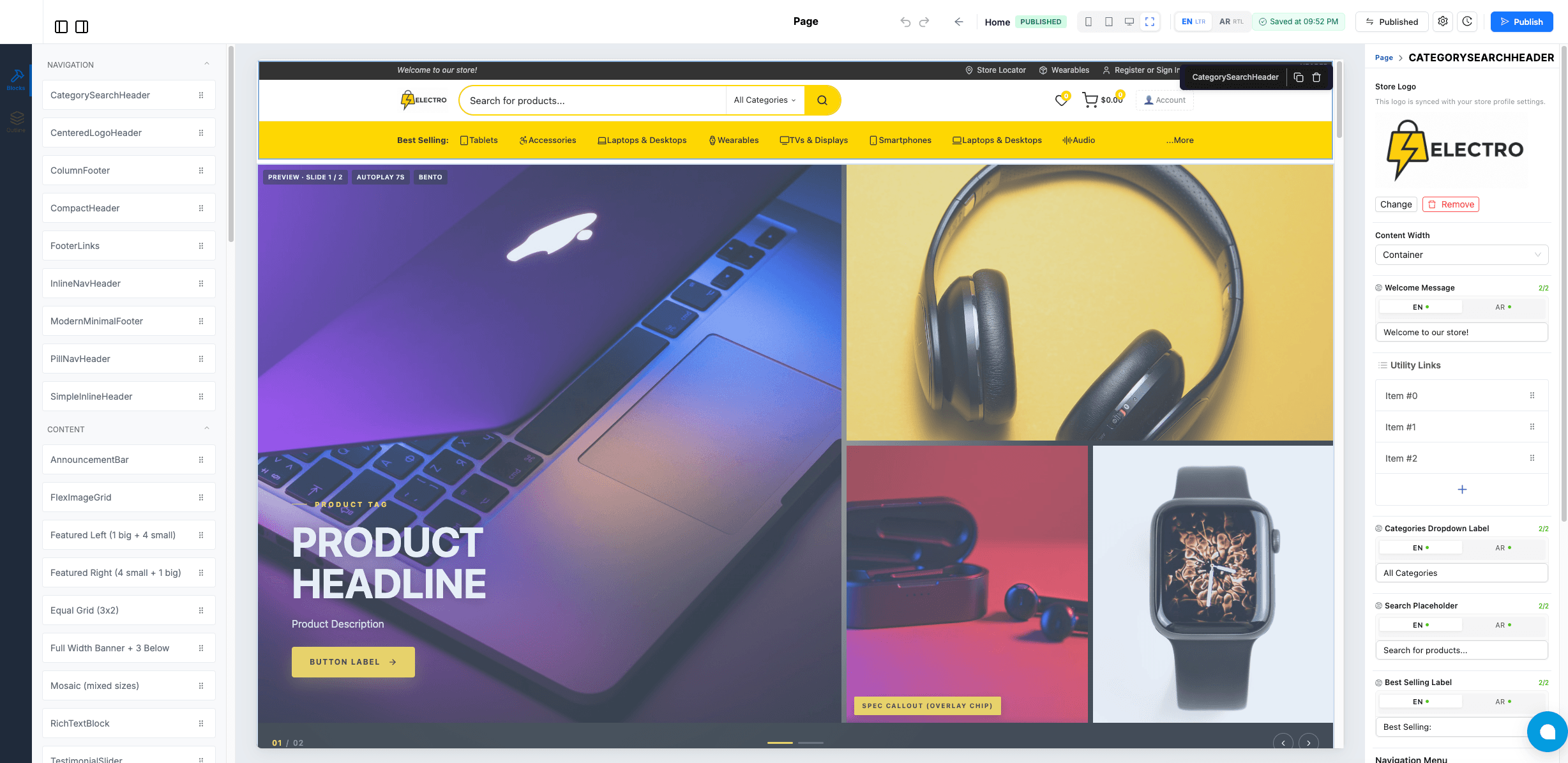
If you've spent more than ten minutes researching ecommerce platforms, you already know the trap. Every “free” website builder turns out to charge $29–$299 a month the moment you want a real store. Every “drag-and-drop” editor locks the good blocks behind an upgrade. Every “multilingual storefront” is a $19 plugin on top of a $79 plan.
CartQu rebuilt all of that on a different idea: a free ecommerce website builder where every feature — drag-and-drop blocks, bilingual storefronts, AI components, smart catalog integration, instant publishing — is included from day one. No trial. No credit card. No “pro tier.”
This guide walks through exactly what CartQu's page builder gives you, who it's for, how it compares to Shopify, Wix, and PageFly, and how to launch your first store today.
Start building free — no credit card →
TL;DR — CartQu in 30 seconds
- Free forever — every feature available on the free plan, no trial countdown.
- Drag-and-drop builder with 40+ pre-built ecommerce blocks (hero, product grids, category showcases, footers, etc.).
- Smart pickers that auto-fill product, category, and brand data from your catalog.
- Bilingual & multilingual by default — full Arabic RTL support, plus any languages you add.
- Design tokens so changing your brand color updates the whole site in one click.
- Instant publishing — no deploys, no waiting, no broken builds.
- AI-generated components for blocks that don't exist yet.
- Multi-store dashboard for agencies and brands with regional storefronts.
Why most ecommerce platforms cost too much for too little
Most founders discover the same trap on day one. The “starter” plan covers basic templates. Anything that actually drives sales — custom layouts, multilingual support, A/B testing, removing the platform's branding — is paywalled.
A typical Shopify-plus-page-builder stack looks like this:
| Item | Cost |
|---|---|
| Shopify Basic | $39 / month |
| PageFly Pro | $99 / month |
| Translation plugin | $19 / month |
| Premium theme | $250 one-time |
| Total before your first sale | $157/month + $250 setup |
That's roughly $2,000 in your first year, before any inventory, ads, or shipping costs. Most stores fail within six months — the cash they spent on subscriptions could have been spent on customer acquisition instead.
CartQu charges $0 for the build. You only pay when you scale into volume tiers, which means you can iterate, test, and learn for as long as it takes to find what works.
See what's included in the free plan →
What is a free drag-and-drop ecommerce builder?
A drag-and-drop ecommerce builder is a visual editor that lets you assemble a real online store by dragging pre-built blocks onto a canvas — instead of writing code or fighting a rigid theme.
The good ones do four things at once:
- Look professional out of the box — without you choosing fonts, spacing, or colors from scratch.
- Stay connected to your product catalog — so the homepage updates when you add products.
- Adapt to every device — mobile, tablet, desktop, without you maintaining three versions.
- Publish instantly — so you can iterate fast and ship without engineers.
CartQu does all four, and it does them in any language your customers speak.
Drag-and-drop ecommerce blocks: build your homepage in 30 minutes
Open CartQu's editor and you see a blank canvas with a sidebar of categorized blocks. Drag one onto the page, drop it where you want, and the canvas updates the moment you let go.
CartQu ships with 40+ pre-built ecommerce components, every one designed for a real merchandising job:
- Headers — minimal, centered-logo, mega-menu, search-first.
- Hero banners — single image, slider, parallax, illustrated.
- Product grids and carousels — featured, on-sale, new arrivals, brand-filtered.
- Category showcases — pill nav, tabs, mega-grid, hero-style.
- Promo blocks — announcement bars, countdown banners, trust badges.
- Content sections — rich text, testimonials, image grids, newsletter signups.
- Footers — column layouts, link blocks, social bar, payment methods.
You drag, you drop, you edit text inline, and the canvas reflects every change in real time. There's no “save and refresh” loop. What you see is what your visitors see.
Smart pickers: connect your catalog to your homepage automatically
This is where CartQu pulls ahead of every drag-and-drop builder we benchmarked.
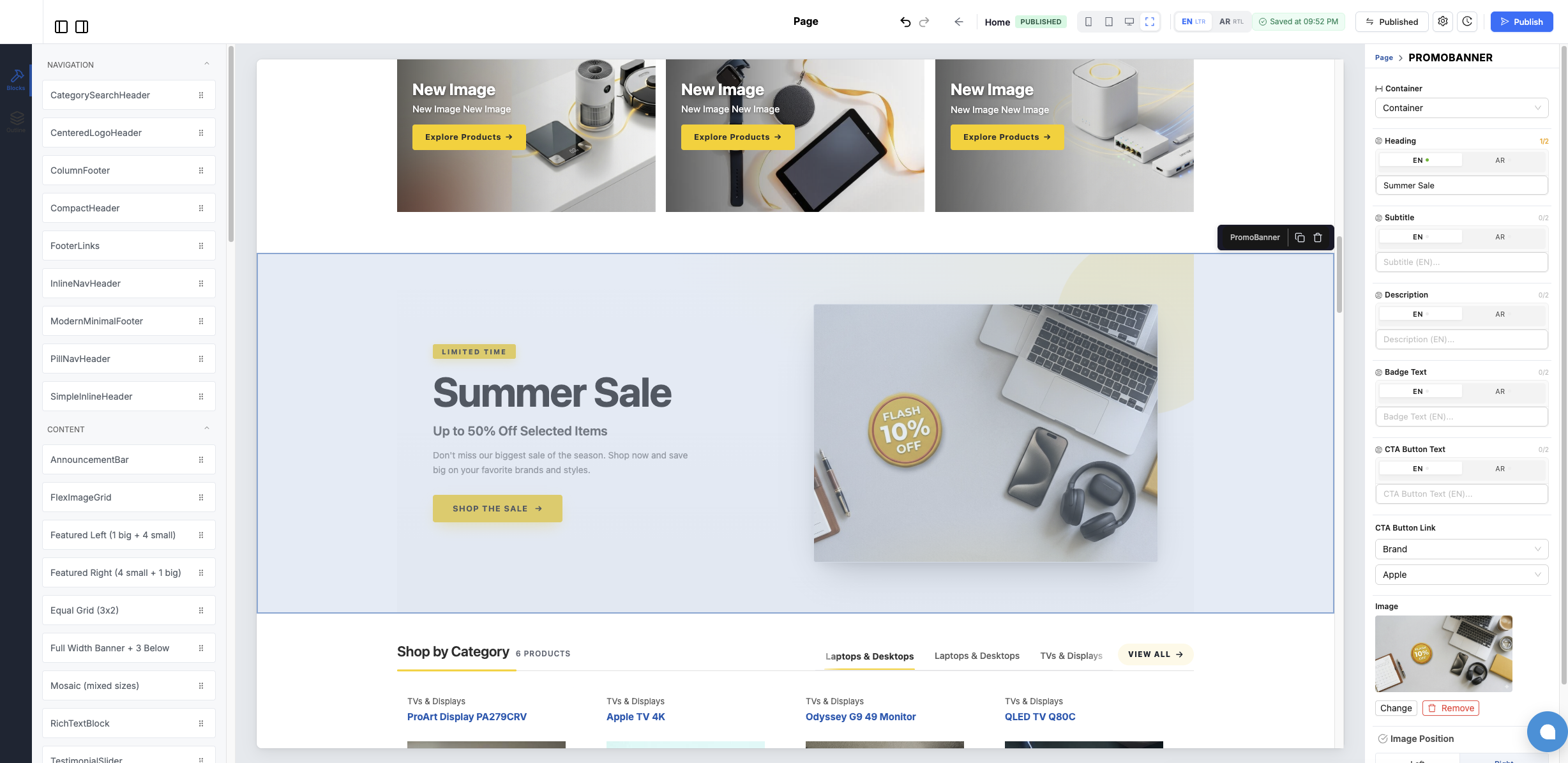
When you add a “Shop by Category” block, you select a category from a picker. CartQu auto-fills its name, image, icon, and the most recent products in it — pulling live from your catalog. Same with brands. Same with collections. Same with sale items.
That means:
- Add a product to a category, and every block showing that category picks it up automatically.
- Rename a brand, and the homepage updates everywhere it appears.
- Run a sale, and your “Sale” carousel fills itself.
You don't manage two databases (your catalog and your homepage). You manage one. The homepage reads from it.
This is a problem every other builder fixes with manual data entry. CartQu fixes it with a smarter picker.
Design tokens and themes: keep your store on-brand with one click
Drag-and-drop is the easy part. The hard part is making your store look like yours — not a templated knockoff of someone else's.
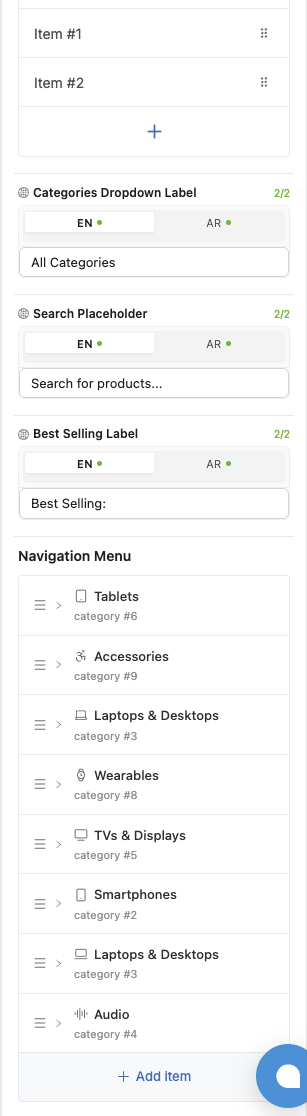
CartQu runs on a token-based design system. Your colors, fonts, spacing, and corner radii live in one place. Change your primary color from purple to teal, and every button, badge, and link across your entire site updates instantly. Switch the font from serif to sans-serif — same thing. Tighten or loosen your spacing scale — same thing.
It's how Apple, Stripe, and Notion keep their design consistent. Now it's how your store does.
You also get a theme system with multiple pre-designed layouts to start from. Pick one, customize it, save your own version, or build from a blank canvas. Whichever you choose, the design tokens travel with you.
Mobile-responsive design is built into every block
About 70% of ecommerce traffic comes from mobile. CartQu treats that as the default, not an afterthought.
Every block ships with three breakpoints — desktop, tablet, and mobile — and you can preview each one from the canvas without leaving the editor. Tweak a heading size on mobile? It only changes mobile. Hide a section on tablet? Only tablet. The block adapts; you stay in flow.
No separate “mobile editor.” No “this looks broken on iPhone” surprises. What you preview is what your customers see.
Rich text editor for content pages (About, Returns, Story)
Need an About Us page? A returns policy? A founder's story? CartQu's rich-text editor opens in a full-screen modal with headings, lists, links, color, alignment, quote blocks, and code formatting — with a separate language tab for each storefront language.
Write your English version, switch to Arabic, write the translation in the same place. No copy-pasting from Google Docs. No styling that mysteriously breaks.
The same editor powers your blog posts, your shipping FAQ, your privacy policy — every long-form page on your store.
Bilingual storefronts: native Arabic, RTL, and multilingual support
Most page builders treat translation as an afterthought. CartQu was built bilingual from day one.
- One click flips the canvas language — English, Arabic, French, whatever you enable — including full right-to-left layout for Arabic, Hebrew, Persian, and Urdu.
- Every text field has language tabs built in. Type your English headline, switch to Arabic, type the translation. They live on the same component, not on a duplicate page.
- Your storefront auto-detects the visitor's language and serves the right version. No duplicate pages. No two CMS systems. No copy-paste sync.
If you're selling to the Middle East, North Africa, Europe, or any multilingual market, this is the single best reason to choose CartQu over Shopify or Wix — both of which charge for translation plugins that still don't handle RTL well.

Instant publishing — from edit to live in seconds
Click publish. Your changes are live in seconds.
CartQu uses on-demand revalidation under the hood — meaning your storefront stays as fast as a static site but updates the moment you hit save. Visitors get instant page loads. You get instant publishing.
Nobody gets a 10-minute deploy wait. Nobody gets a 2 AM “the site is down because the build failed” surprise.
AI-generated components: skip the developer queue
Need a block that doesn't exist yet?
Describe it. CartQu's AI generates a fully working component — React, responsive, on-brand — and drops it into your editor library. Re-usable across every page on your store.
Need a “before and after” slider for your skincare brand? A pricing comparison table for your subscription tiers? A countdown timer for your flash sale? Ask. Drop it in. Ship.
This is how CartQu skips the “file a feature request and wait six weeks” loop that kills momentum on every other platform.
Multi-store dashboard for agencies and growing brands
Because CartQu is a multi-tenant platform, one dashboard can manage multiple stores — perfect for:
- Agencies spinning up storefronts for multiple clients.
- Brands with regional storefronts (UAE, Saudi Arabia, Egypt, etc.).
- Merchants testing a new sub-brand without renting another subscription.
No per-seat pricing. No “agency tier” upgrade. Just more stores.
CartQu vs Shopify vs Wix vs PageFly: a quick comparison
| Feature | CartQu | Shopify | Wix | PageFly |
|---|---|---|---|---|
| Starting price | Free | $39 / mo | $27 / mo | $0 (limited) + Shopify cost |
| Drag-and-drop editor | ✅ | Limited | ✅ | ✅ |
| Pre-built ecommerce blocks | 40+ | Theme-bound | ~30 | 100+ |
| Smart catalog pickers | ✅ | Manual | Manual | Manual |
| Native multilingual / RTL | ✅ | Paid app | Paid plan | Via Shopify |
| Design tokens | ✅ | Theme only | Limited | ❌ |
| AI-generated components | ✅ | ❌ | Limited | ❌ |
| Multi-store on one account | ✅ | One per plan | One per plan | One per plan |
| Instant publishing | ✅ | ✅ | ✅ | ✅ |
| Credit card required to start | No | Yes | Yes | No (Shopify needed) |
If you want a real comparison: Shopify and Wix are mature platforms with bigger app ecosystems. CartQu is the right choice when price, multilingual support, and multi-store flexibility matter most.
Try CartQu free — see if it fits →
Who CartQu is for
- First-time founders who don't have $10,000 for a custom build or $79/month for a “real” page builder.
- Agencies that want to spin up multiple storefronts from one dashboard without per-seat pricing.
- Bilingual merchants — anyone selling in Arabic, French, or any non-English market who's tired of half-broken translation plugins.
- Brands relaunching — if your current store was built five years ago and you're scared of the migration, CartQu lets you rebuild without paying twice.
What you get with a free CartQu account
- Full access to all 40+ blocks, themes, and design tokens
- Unlimited pages, unlimited products, unlimited languages
- Built-in image hosting and CDN
- Mobile-responsive previews
- Rich text editor, smart pickers, AI components
- Instant publishing
- A working storefront on your subdomain — point your domain whenever you're ready
- Multi-store dashboard
No “starter tier.” No “pro feature.” No “upgrade to unlock multilingual.”
Frequently asked questions
Is CartQu really free?
Yes. The page builder, all 40+ blocks, multilingual support, instant publishing, and the multi-store dashboard are all free with no time limit. You only pay when your store reaches volume-based tiers — and those tiers are designed so you pay out of revenue, not out of pocket.
What's the catch?
There isn't one. CartQu makes money the same way payment processors and marketplaces do — a small percentage of transactions on stores that grow into volume tiers. If your store is small or just getting started, you pay nothing.
Do I need to know how to code to use CartQu?
No. The drag-and-drop editor handles 95% of what most stores need. For the remaining 5%, the AI component generator lets you describe a custom block in plain English and drops it into your library.
Can I use my own domain?
Yes. Every CartQu store starts on a free subdomain (yourstore.cartqu.com) and can connect a custom domain whenever you're ready — also at no cost.
Does CartQu really support Arabic and RTL?
Yes — natively. RTL is built into the editor, every block, and the storefront renderer. You don't install a plugin or pay an upgrade fee. Add Arabic as a language and your editor canvas flips, including text fields that show language tabs side by side.
How many languages can my storefront have?
Unlimited. Add any languages your tenant supports and every translatable field on every block automatically gets a tab for each. Your storefront auto-detects the visitor's language.
Can I migrate from Shopify or WooCommerce?
Yes. CartQu's import flow handles product catalogs, categories, brands, and customer data from Shopify, WooCommerce, and CSV files. The visual build of your new storefront happens in the page builder.
How long does it take to launch a store?
A working storefront — homepage, product catalog, About page, footer — takes most first-time founders 2–4 hours. Experienced merchants often launch a full multi-language store in a single day.
What happens if my store grows? Will I have to pay later?
Yes — at high revenue tiers, CartQu charges a small transaction percentage to keep the platform sustainable. The free tier covers everything most stores need until they're already profitable.
Ready to launch?
Open CartQu. Pick a theme. Drag your first block. By the time your coffee's cold, you'll have a homepage that converts.
No credit card. No trial countdown. No “upgrade to continue.”
Create your free CartQu store →
CartQu is free to build, free to publish, and free to grow. We make money when you do.
Ready to build your online store?
Put this guide into practice with CartQu — the all-in-one e-commerce platform with multi-store management, integrated payments, and a complete free package.
Related Articles

How to Start an Online Store in 2026 (Step-by-Step Guide)
A complete, no-fluff guide for 2026: pick your niche, choose the right platform, set up payments, build your brand, launch, and drive your first sales — without writing a single line of code.
Read article